
What a Useful Dog Profile Should Include
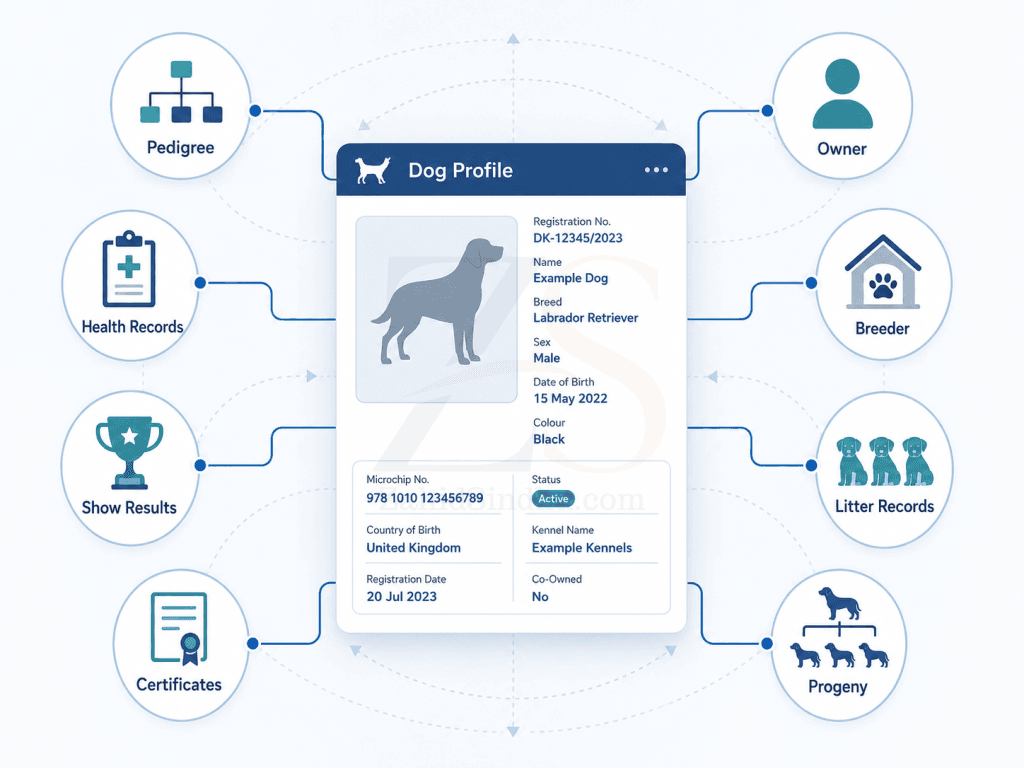
A useful dog profile is not a pretty page with a dog’s name, photo, and registration number. It is the central record that tells the club, breeder, owner, judge, and future buyer what the dog is, where it came from, what it has done, and which records support those claims.
For canine clubs, the dog profile should sit at the heart of the registry. If the profile is weak, everything around it becomes weaker too: pedigrees, show catalogues, breeding records, health checks, litter records, certificates, and member service.
A good dog profile does not need to be overloaded. It needs to be complete, structured, searchable, and connected to approved club data.
The dog profile should start with identity
Every useful dog profile needs a clear identity section.
This is the part that answers the basic question: “Which dog are we talking about?”
At minimum, it should include:
- Registered name
- Registration number
- Breed
- Sex
- Date of birth
- Microchip number
- Coat type
- Colour
- Current status
- Photo, if available
This sounds basic, but clubs often underestimate it. A small mistake in the dog’s name, microchip, or registration number can travel through entry forms, catalogues, result sheets, certificates, and pedigrees.
Once that happens, the club no longer has one mistake. It has a chain of mistakes.
The identity section should not depend on a scanned certificate, a WhatsApp message, or someone’s memory. It should come from the approved registration record.
Pedigree should be part of the profile, not a separate PDF
A dog profile is incomplete if the pedigree only exists as a PDF attachment.
The pedigree should be visible as structured data, not stored only as a PDF. That means the sire, dam, grandparents, and further generations should link to their own dog records where possible.
This matters because pedigree data is not only for printing certificates. It supports:
- Breeding decisions
- Linebreeding checks
- Health history review
- Kennel record review
- Verification of parentage
- Future litter planning
- Public trust in the registry
A PDF pedigree can show information, but it cannot easily connect information. A structured pedigree can.
For example, when the sire and dam are clickable records, a breeder can move from one dog to the next without asking the club office to search old files. A club can also correct data in one place rather than updating multiple disconnected documents.

Parent links should be clear and traceable
The dog profile should show the sire and dam clearly.
This should not be a plain text field typed into a page. It should link to the registered records of both parents.
That one detail changes the quality of the profile.
A linked parent record allows users to check:
- Parent registration details
- Health results
- Show grading
- Working titles
- Breed survey status
- Progeny
- Ownership or breeder information, where public
For breed clubs, this is especially important. Breeding records depend on traceable parentage. If the parent data is vague, the litter record becomes weaker too.
Health and examination data should be visible where relevant
A useful dog profile should include health and examination records that matter to the breed and the club’s rules.
For German Shepherd Dogs, this may include HD rating, ED rating, DNA status, and other breed-specific checks. For other breeds, the profile may need different health fields.
The point is not to add every possible medical detail. The point is to record the club-approved checks that affect breeding, registration, transparency, and trust.
The profile should make it clear:
- Which health checks exist
- Which results have been recorded
- Which authority or process accepted them
- Which fields are still blank
- Which results affect breeding eligibility
Blank fields also matter. If a dog has no HD rating recorded, the profile should not hide that fact. A blank field tells the user that the club has no approved record for that item.
That is much better than leaving people to guess.
Ownership and breeder details should be handled carefully
A dog profile should show breeder and owner information, but the club needs to think carefully about privacy.
Some information may be public. Some should stay visible only to club administrators or logged-in members.
The profile should normally include:
- Breeder name
- Current owner name
- Kennel name, if applicable
- Membership link, if public
- Ownership history, for admin use
- Transfer record, for admin use
For public pages, the club should avoid exposing private contact information unless it has a clear policy and member consent.
A good system separates public profile data from administrative data. The public can verify the dog. The office can still see the full record.
Show results should connect back to the dog
A useful dog profile should include the dog’s show record.
This should not sit only in old catalogues or result PDFs. If a dog has entered a show, received a grading, won a class, or earned a title, that result should connect to the dog profile.
A show section may include:
- Show date
- Show name
- Judge
- Class
- Catalogue number
- Result or placing
- Grading
- Seat or position
- Title earned, if applicable
This helps breeders, members, and club officials review a dog’s record without searching through event folders.
It also helps the club avoid repeated manual work. Once show results are approved, the same data can support dog profiles, certificates, leaderboards, title records, and future catalogue references.
Breeding records should connect to the profile
A dog profile should show breeding activity where the club’s rules allow it.
For a male, this may include stud certificates, matings, and progeny. For a female, it may include litter records and offspring.
This is where the profile becomes a working record, not a static page.
A strong breeding section can show:
- Approved matings
- Litter records
- Progeny
- Stud certificates
- Breeding eligibility
- Restrictions or notes visible to admins
- Linked sire and dam records
This helps the club answer common questions faster.
Has this dog produced a litter? Which dogs are its offspring? Was the mating approved? Did the club issue a stud certificate? Which litter record connects to this dog?
Without a connected dog profile, these questions often turn into manual searching.
Certificates should be linked to the record they came from
Certificates should not float around as isolated PDFs.
If the club issues a registration certificate, pedigree certificate, show certificate, breed survey certificate, health certificate, or title certificate, the dog profile should show the related record.
The certificate should ideally connect to:
- Dog record
- Member record
- Event or application record
- Approval date
- Certificate number
- QR or verification link
- Issuing authority
- Admin history
This protects the club.
It also helps members. If a member misplaces a certificate, the club can reissue or verify it from the approved record rather than rebuilding it from messages and attachments.
The profile should show status, not only history
A dog profile should help people understand the dog’s current position.
For example:
- Active or inactive
- Alive or deceased, if recorded
- Eligible or not eligible for breeding, if rules apply
- Surveyed or not surveyed
- Health records complete or incomplete
- DNA proven, stored, pending, or not available
- Ownership confirmed or pending transfer
This is where many club databases fail. They store old information but do not make the current status easy to understand.
A useful dog profile should answer the next practical question: “What can be done with this dog now?”
Can it be entered in a show? Can it be used for breeding? Is ownership up to date? Is some record missing? Is an approval pending?
That kind of clarity saves time for the club office and reduces confusion for members.
Public profile and admin profile are not the same thing
A dog profile usually needs two views.
The public view should help people verify the dog and understand its official record.
The admin view should help the club manage the dog.
Public view may include:
- Registered name
- Registration number
- Breed
- Sex
- Date of birth
- Sire and dam
- Pedigree
- Breeder
- Owner, if allowed
- Show results
- Health ratings approved for public display
Admin view may include:
- Application history
- Uploaded documents
- Payment history
- Internal notes
- Approval status
- Correction history
- Ownership transfer trail
- Member contact details
- Duplicate checks
- Sensitive records
Mixing these two views creates problems. If everything is public, privacy suffers. If everything is private, the registry loses public value.
The better approach is a structured record with clear visibility rules.
A useful profile should reduce calls to the club office
One test for a dog profile is simple.
Does it answer the questions people keep asking the secretary?
For example:
- What is the dog’s registration number?
- Who is the sire?
- Who is the dam?
- Who bred the dog?
- Who owns the dog?
- What is the microchip number?
- What show grading does the dog have?
- Does the dog have an HD or ED rating?
- Has the dog produced progeny?
- Can I see the pedigree?
- Can I verify this certificate?
If members still need to call or message the office for basic answers, the profile is not doing enough work.
That does not mean every detail should be public. It means common verification details should be easy to find from approved records.
Example: a connected dog profile on GSDCP.org
A good example is the GSDCP dog profile for Team United’s Hello Baby:
View the dog profile on GSDCP.org
The useful part is not only the basic profile. It is the way the profile connects to related sections such as pedigree, siblings, progeny, conformation shows, HD heredity, ED heredity, and other breed-specific records.
That is the direction more canine clubs should move toward.
A dog profile should not be a dead-end page. It should be a connected record.
Where CCMS makes this easier
This is one of the reasons we built Inspedium’s Canine Club Management System (CCMS), around the idea of connected records.
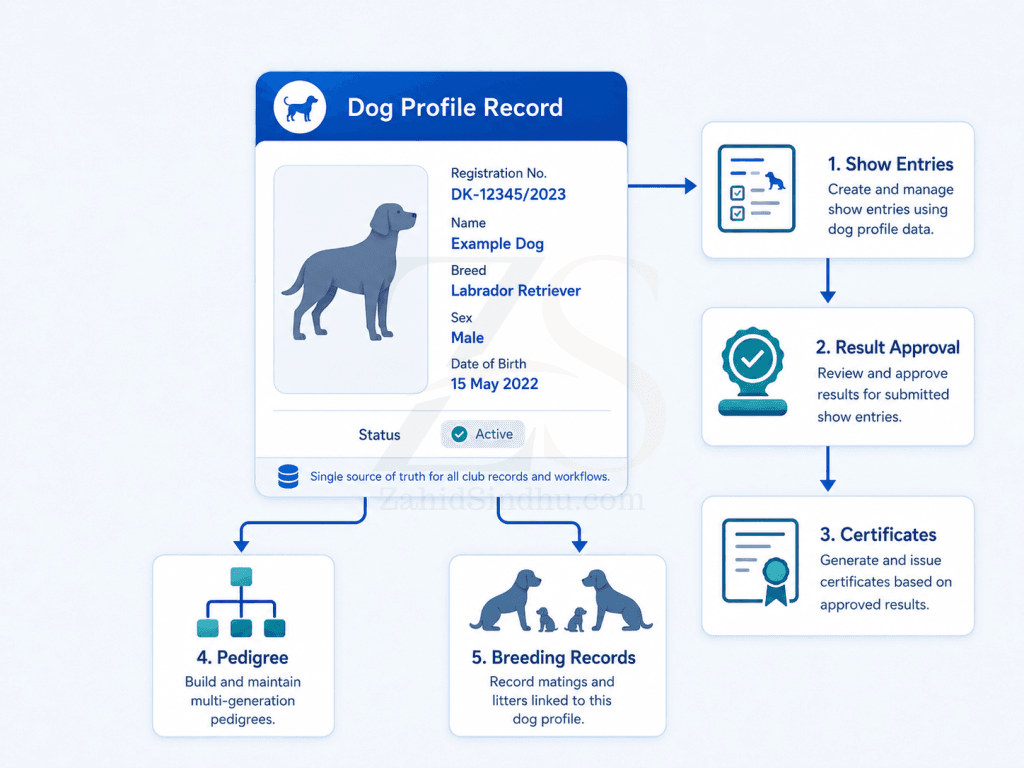
In CCMS, the dog profile is not created separately from the club’s daily work. It grows from the same approved data the club already handles:
- Dog registration
- Pedigree records
- Litter records
- Member records
- Kennel records
- Health records
- Event entries
- Results
- Certificates
- Payments
- Approval workflows
That matters because a club should not have to update the same dog in five different places.
If the dog is entered in a show, that entry should connect to the dog profile. If the result is approved, it should connect back to the dog. If a certificate is issued, it should come from the same approved record. If the dog later appears in a pedigree, the system should use the same registered identity.
This is not about making administration look modern. It is about reducing duplicate work, reducing errors, and giving the club better control over its own records.
What clubs should avoid
A weak dog profile usually has one or more of these problems:
- The profile is only a scanned certificate
- Pedigree data is locked inside PDFs
- Parent names are plain text, not linked records
- Show results sit in old catalogues only
- Health results are stored in messages or folders
- Ownership changes are not traceable
- Certificates are generated manually from copied data
- Public and admin data are mixed together
- There is no clear record status
- Corrections happen without an audit trail
These problems do not always show up on quiet days. They show up when there is a dispute, a correction request, a show deadline, a breeding approval, or a certificate verification issue.
That is when record quality gets tested.
A practical checklist for a useful dog profile
A useful dog profile should include these sections:
| Section | Purpose |
|---|---|
| Identity | Confirms which dog the record belongs to |
| Registration | Shows the official club registration details |
| Pedigree | Connects the dog to its ancestry |
| Parents | Links sire and dam records |
| Breeder and owner | Shows the people connected to the dog |
| Health records | Shows approved breed-relevant checks |
| Show results | Connects event performance to the dog |
| Titles and grades | Shows achievements and status |
| Breeding records | Connects litters, matings, and progeny |
| Certificates | Links issued documents to approved data |
| Status | Shows what is current, pending, missing, or restricted |
| Audit trail | Helps admins track changes and approvals |
A club does not have to publish every field. But the system behind the profile should hold these records in a structured way.
The real value of a dog profile
The real value of a dog profile is trust.
Members trust the club because records are clear. Breeders trust the system because parentage, health, and show records are traceable. Buyers trust the registry because they can verify basic facts. Committees trust their own decisions because they can see the records behind them.
A weak dog profile creates doubt.
A useful dog profile gives everyone the same starting point.
For modern canine clubs, that is no longer optional administration. It is the base record that supports almost everything else.
FAQ section
A dog profile is the central record for a registered dog. It should show the dog’s identity, pedigree, parentage, breeder, owner, health records, show results, breeding records, certificates, and current status.
Part of it should usually be public, especially basic registration and verification details. Private contact information, internal notes, documents, payments, and approval history should stay restricted to authorised users.
Structured pedigree data can link dogs, parents, health records, and breeding history. A PDF can display a pedigree, but it does not work well as a connected club record.
The biggest mistake is treating the dog profile as a display page instead of the central record. A useful dog profile should connect to registration, pedigree, health, events, results, certificates, and breeding records.
Have a question or club admin experience to share?
If you run, manage, or volunteer with a canine club and this article reflects a problem you have seen, send me a short note with context.
I’m especially interested in practical administration problems around member records, dog records, show entries, litter registration, certificates, volunteer workload, and handover.
Zahid’s Field Notes
Practical notes from the builder’s desk.
Occasional notes on digital systems, canine administration, business workflows, AI, email, hosting, and the small operational details that shape trust.
What I usually write about:
- How better records improve daily operations
- Why email, hosting, and infrastructure still matter
- What canine clubs can learn from business systems
- Practical AI use without losing human control
- Lessons from building and operating real systems
No fixed schedule. No recycled content. Just useful notes when there is something worth sharing.