
Why Email Still Matters More Than People Think
Email still matters because business needs memory. Not vague memory. Not someone’s recollection from a meeting. Not a half-remembered chat thread. Email gives a company a searchable, time-stamped record of what was said, agreed, approved, ordered, changed, rejected, and delivered.
That sounds boring until something goes wrong.
A vendor says the price was different.
A client says they never approved the work.
A team member says they were not told about a deadline.
A customer disputes a payment.
A manager asks why a purchase was made.
A lawyer asks for the communication trail.
At that point, email stops looking old-fashioned. It starts looking like the operating record of the business.
Email is not only a communication tool
Most people think of email as inbox clutter. That is understandable. Many inboxes are full of noise: newsletters, alerts, automated reports, marketing messages, reminders, and badly written follow-ups.
But that is not the real value of email.
The real value is that email sits between people, departments, systems, customers, suppliers, banks, platforms, and regulators. It works across companies. It works across devices. It works across time zones. It does not require everyone to use the same app or belong to the same workspace.
That makes email one of the few business tools that still works as a common record layer.
A WhatsApp message may solve something quickly. A phone call may clear confusion. A meeting may help people agree. But email is where the decision often becomes traceable.
That trace matters.
Businesses run on agreements, not conversations
Every business has two types of communication.
The first type is conversational. It helps people move quickly.
Examples:
- “Can you check this?”
- “Please call the client.”
- “Is this ready?”
- “Send me the file.”
- “What did the supplier say?”
The second type is operational. It creates a record.
Examples:
- “Please proceed with the revised quotation.”
- “We approve the purchase order.”
- “The delivery deadline is 15 July.”
- “The client has accepted the final design.”
- “The payment terms are 50% advance and 50% on completion.”
- “The following items are excluded from the scope.”
The problem starts when businesses treat operational communication like casual conversation.
That is how disputes are born.
A serious business needs a simple rule: quick discussions can happen anywhere, but important instructions should land in email before action is taken.
A real example from Inspedium
We have seen this at Inspedium many times.
In one case, a large company asked us to make a DNS change. Since DNS changes can affect websites, email, routing, and internal systems, we did not act on a casual instruction. We asked them to send the request by email first.
They did.
We made the change exactly as requested. Later, their team was not ready on their side for internal reasons. The change caused problems for them, and the first reaction was to blame us for making it.
That could have turned into a messy argument.
Instead, we had the email trail.
The request had come from them. The instruction was clear. The timing was clear. The action we took matched the written approval.
That is the point. Email did not make the technical change safer by itself. But it made the responsibility clear. It protected both the work and the relationship because the facts were available.
This is why serious operational requests should not depend on memory, phone calls, or casual messages. When the action can affect a business system, the approval should sit in email.
Email creates a timeline
A good email thread tells a story in order.
Who asked for what?
Who replied?
What changed?
Who approved it?
When did the approval happen?
What attachment was shared?
What version was accepted?
What deadline was agreed?
This timeline has value because business problems usually come from missing context.
A manager sees an invoice and asks why the amount changed. The answer may sit in an email thread from three weeks earlier. A client complains about a delay. The reply may show that the client sent late feedback. A supplier questions payment terms. The email trail may show the terms agreed before work started.
Email gives the business a way to reconstruct events.
This is the same reason better systems start with better records. A system can only help the business when the record behind it is clear enough to trust.
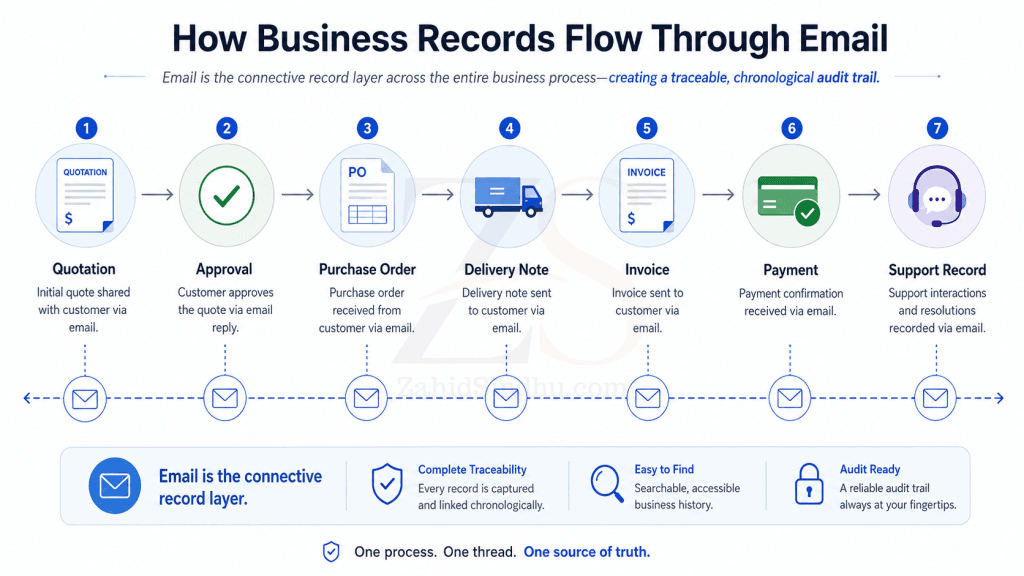
Without that timeline, people argue from memory. Memory is weak evidence. It changes with stress, pressure, and convenience.
Email protects companies from internal confusion
Many business owners think email matters mainly for client communication. That is too narrow.
Email also protects the company from itself.
Most businesses lose time because internal instructions are scattered across calls, voice notes, chat groups, spreadsheets, and personal inboxes. One department knows something the other does not. One employee leaves, and half the context leaves with them. One manager approves something verbally, then forgets the exact terms later.
This creates a quiet operational tax.
People repeat work.
They ask the same questions again.
They search old chats.
They call people for details that should have been recorded.
They delay decisions because the background is unclear.
A disciplined email culture reduces that waste.
The same principle applies outside normal businesses as well: weak records turn operational confusion into trust problems, especially when people need to prove what was approved, paid, changed, or recorded.
Not every message needs to be formal. But approvals, commitments, changes, exceptions, and final decisions should be easy to find later.
Email is still the best handoff between organizations
Inside a company, you can use Slack, Teams, WhatsApp, project management software, or a CRM. But outside the company, communication becomes messier.
Your client may use Google Workspace.
Your supplier may use Microsoft 365.
Your accountant may use a local email provider.
Your lawyer may use a secure firm mailbox.
Your customer may only trust the address printed on your invoice.
Email remains the common business handoff.
That matters because most companies do not operate in isolation. They work with vendors, clients, auditors, consultants, banks, tax advisers, software providers, insurers, contractors, and government departments.
Email gives all of them a shared channel without forcing one side into the other side’s internal tools.
This is why founders should avoid treating email as a leftover from the past. It is still the protocol of business identity.
Your email address is part of your business credibility
A company email address does more than send messages. It signals identity.
There is a difference between:
sales.companyname@gmail.comsales@companyname.com
The second one looks like a business. It connects to the company domain. It gives customers a stable point of contact. It also keeps communication inside company-controlled infrastructure instead of personal accounts.
This matters more as a business grows.
A founder can get away with informal tools in the early days. But once the company has staff, clients, vendors, invoices, support issues, and legal obligations, casual communication starts creating risk.
Using proper business email is one of the first signs that the company has moved from improvisation to structure.
At Inspedium, this is one reason we treat business email as part of operational infrastructure, not just another mailbox.
Poor email habits create real business risk
Email itself is not enough. Bad email habits can still damage a business.
Common problems include:
- Important approvals sent from personal accounts
- Purchase decisions buried in long informal threads
- No clear subject lines
- Attachments sent without version names
- Verbal approvals never confirmed in writing
- Staff using private inboxes for company work
- No shared mailboxes for sales, support, billing, or operations
- No retention policy
- No backup
- No access plan when employees leave
- Weak passwords and no two-factor authentication
These are not small issues. They affect continuity.
A business should not depend on one employee’s personal inbox to understand a client account. It should not lose years of supplier history because a staff member resigned. It should not struggle to prove approval because the only record was a voice note in someone’s phone.
That is not a technology problem. It is a management problem.
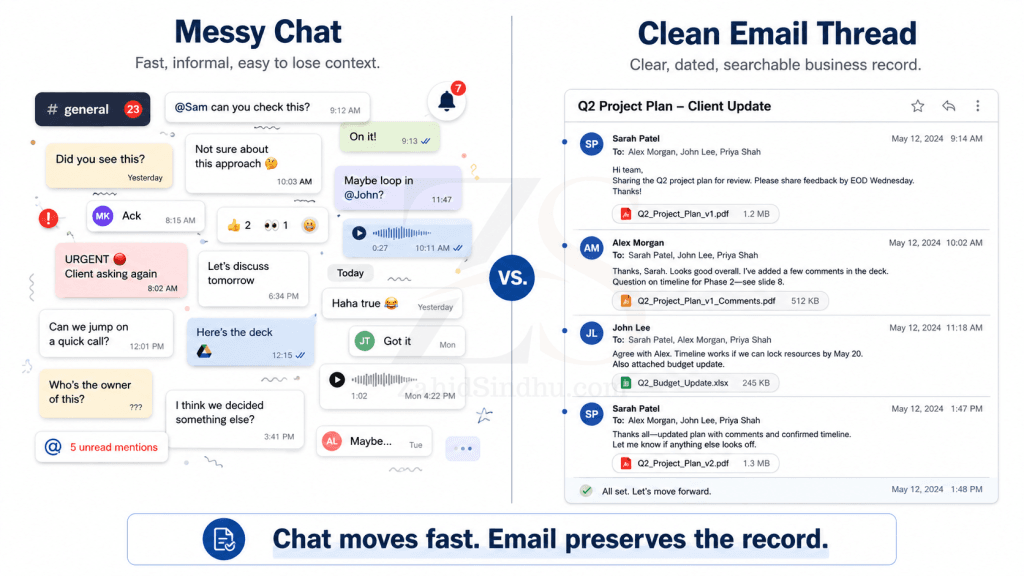
Chat is fast, but email is better for final records
This is not an argument against chat tools. I use quick communication channels too. They are useful for coordination.
But chat has limits.
Chat is designed for speed. Email is better for record.
A chat message often depends on surrounding context. It may sit inside a private group, get buried under hundreds of messages, or become hard to search after months. Voice notes are worse because they force the next person to listen instead of scan.
Email supports longer context. It handles attachments cleanly. It allows better subject lines. It travels outside closed platforms. It fits better with ticketing systems, CRMs, audit processes, and document trails.
A simple rule works well:
Use chat to move the discussion forward. Use email to confirm the decision.
I have seen the same pattern in club administration too: messages are good for discussion, but weak as record systems when payments, approvals, corrections, and complaints need to be traced later.
For example:
“Following our call, we will proceed with Option B at the revised price of Rs. X. Delivery remains scheduled for 20 July. Please reply if anything is incorrect.”
That one email can prevent weeks of confusion later.
Email supports audits and compliance
Founders sometimes hear the word compliance and assume it only applies to banks, listed companies, or large corporations.
That is a mistake.
Even a small business may need records for:
- Tax questions
- Client disputes
- Vendor claims
- Employment issues
- Payment follow-ups
- Insurance matters
- Contract reviews
- Internal investigations
- Regulatory requests
- Ownership or management changes
Email helps because it gives a dated trail. It can show the sequence of communication before a decision or transaction.
This does not mean every email has legal value in every situation. Laws differ by country, industry, and contract type. A business should get legal advice for formal retention rules.
But from a management point of view, the lesson is simple: businesses need records they can search and trust.
Email remains one of the most practical ways to maintain those records.
Email also feeds business systems
Modern systems still depend on email.
A CRM logs client communication.
A helpdesk converts emails into tickets.
An accounting system sends invoices and payment reminders.
A project management system sends status updates.
A monitoring system sends alerts.
A document platform sends access notifications.
An e-commerce system sends order records.
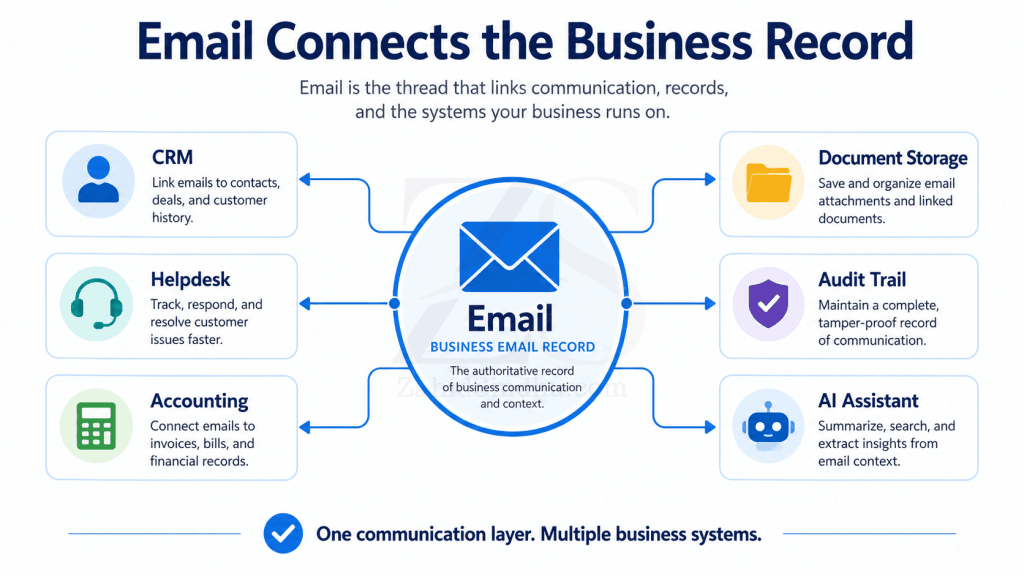
This is another reason email has not disappeared. It became infrastructure.
Many people only see the inbox. They miss the system behind it.
Email connects people to processes. It confirms actions. It sends records from one system to another. It gives customers and staff a fallback channel when dashboards, portals, and apps become confusing.
A founder should think of email as part of the company’s operational backbone, not as a standalone inbox.
The inbox is messy because the business is messy
When business owners complain about email, they often blame email for problems caused by weak systems.
The inbox is overloaded because there is no ticketing system.
Approvals are lost because there is no approval workflow.
Clients send repeated questions because the website is unclear.
Staff copy everyone because roles are undefined.
Vendors chase payments because finance communication is reactive.
Reports arrive everywhere because no one designed a reporting structure.
Email exposes disorder. It does not create all of it.
A messy inbox often tells you something useful: the company has unclear processes.
Instead of saying “email is dead,” a better founder asks:
- Which messages should become tickets?
- Which approvals need a formal workflow?
- Which inboxes should be shared?
- Which emails should be automated?
- Which reports should go to dashboards?
- Which communication should stop completely?
- Which records must be retained?
That is how email becomes cleaner. Not by abandoning it, but by giving it a proper role.
What good email discipline looks like
Good email discipline does not mean writing long formal messages all day.
It means using email properly for business records.
A few habits make a large difference:
- Use company email for company work
Personal accounts should not carry business records. - Confirm important verbal decisions
After a call, send a short summary with the agreed points. - Write useful subject lines
“Approval for revised website scope” is better than “Update.” - Keep one topic per thread where possible
Mixed threads become hard to follow. - Use shared inboxes for shared work
Sales, support, billing, and operations should not depend on one person’s mailbox. - Store attachments with clear names
Version names save time and reduce mistakes. - Set access rules before staff changes happen
The company should keep its records when people move on. - Back up email
Email is too important to leave to chance. - Use two-factor authentication
A compromised mailbox can damage reputation, client trust, and operations. - Decide what belongs in email
Not every message belongs there. But final decisions, approvals, and formal communication usually do.
The founder’s mistake: treating email as admin work
Many founders like new tools. CRMs, dashboards, AI agents, automation platforms, chat apps, task boards, and customer portals all feel more exciting than email.
But tools do not fix weak records.
If the company cannot track who approved what, when a client accepted a change, which quote was final, or why a payment term changed, the system is weak.
Email often contains the missing record.
That is why I see email as part of business infrastructure. It sits close to sales, support, billing, operations, HR, compliance, and management. It may not look innovative, but it carries the history of the company’s decisions.
A founder who ignores email usually pays for it later in confusion, rework, disputes, and lost trust.
AI makes email even more important
AI will not remove email from business. It will make email records more useful.
AI can summarize threads, extract commitments, identify follow-ups, classify support requests, draft replies, and connect communication to customer records. But AI needs reliable input.
If business communication is scattered across private chats, calls, screenshots, and personal inboxes, AI has poor material to work with.
Good email records give AI something structured enough to interpret.
A future CRM or operations system may not require humans to search old emails manually. But the email trail will still matter because it holds the raw business history.
Better records create better automation. Email is one of the main record sources a business already has.
Email is boring infrastructure, and that is the point
Some tools are valuable because they feel new. Email is valuable because it is stable.
It works across organizations.
It creates a dated record.
It supports approvals.
It carries documents.
It connects with business systems.
It gives auditors, managers, and owners a communication trail.
That does not make email perfect. It can be noisy, insecure when poorly managed, and painful when used for everything. But the answer is not to dismiss it.
The answer is to manage it like infrastructure.
For founders and business owners, the lesson is simple: do not judge email by the mess in your inbox. Judge it by the records it gives your business when memory is not enough.
Email still matters because business still needs proof.
FAQ Section
Yes. Small businesses need records for quotes, approvals, invoices, client instructions, vendor terms, and support issues. Email gives them a searchable trail without adding heavy systems too early.
Use WhatsApp for quick coordination, but confirm important decisions by email. This gives the company a better record later.
For final decisions, approvals, external communication, and formal records, email is usually better. Chat works well for fast coordination, but it often becomes hard to search and control over time.
They let important business communication happen through personal accounts, private chats, or verbal instructions without a written confirmation.
Have a systems problem worth discussing?
If this note connects with something you are dealing with in your business, club, team, or workflow, send me a short message with context.
I’m interested in practical problems around records, communication, email, hosting, AI-assisted work, CRM planning, client follow-up, and operational systems.
Zahid’s Field Notes
Practical notes from the builder’s desk.
Occasional notes on digital systems, canine administration, business workflows, AI, email, hosting, and the small operational details that shape trust.
What I usually write about:
- How better records improve daily operations
- Why email, hosting, and infrastructure still matter
- What canine clubs can learn from business systems
- Practical AI use without losing human control
- Lessons from building and operating real systems
No fixed schedule. No recycled content. Just useful notes when there is something worth sharing.