
Why SPF, DKIM, and DMARC Are Business Issues, Not Merely Technical Ones
SPF, DKIM, and DMARC for business are often treated as three DNS records that an IT team or email provider should configure and forget.
That is the wrong way to think about them.
These controls affect whether invoices reach customers, quotations reach prospects, password resets work, staff can use approved software, and criminals can send messages that appear to come from your company.
The technical configuration matters, but the real issue is business identity.
Your domain appears on proposals, invoices, support messages, employment communication, legal notices, payment requests, and account alerts. If other systems cannot trust messages carrying that domain, the problem does not stay inside the IT department.
It moves into sales, finance, customer support, reputation, and management.
This connects to the wider reason email still matters as a business record and trust system.
What do SPF, DKIM, and DMARC actually do?
The three controls perform different jobs.
| Control | Technical purpose | Business question |
|---|---|---|
| SPF | Lists the servers and services authorised to send email for a domain | Which systems are allowed to send as our company? |
| DKIM | Adds a digital signature that receiving servers can verify | Can this sending service prove that it was authorised to send the message? |
| DMARC | Checks domain alignment, communicates a handling policy, and provides reports | Does the domain shown to the recipient match an authenticated domain, and what should happen when it does not? |
SPF checks the source that sent the message. DKIM checks a cryptographic signature attached to the message. DMARC connects authentication to the domain shown in the visible From address. It also lets the domain owner request reports about email using that domain.
No single control answers every question.
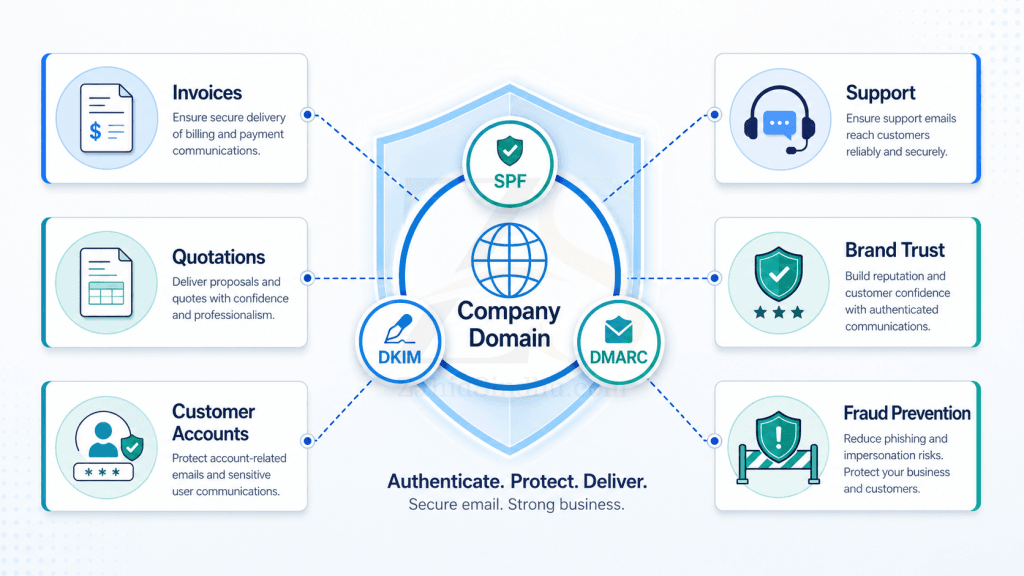
SPF can fail after forwarding. DKIM may remain valid after forwarding, but a DKIM signature can use a domain that differs from the one visible to the recipient. DMARC adds the missing alignment check.
The business question is therefore not simply, “Do we have these DNS records?”
It is:
Do we know every system that sends email using our company’s identity, and do we control what those systems are allowed to do?
Email delivery affects revenue and operations
Businesses often think about email delivery as a marketing problem.
It is much wider than that.
Consider the effect of these messages failing:
- A quotation does not reach a prospective customer.
- An invoice lands in spam.
- A payment reminder gets rejected.
- A password reset never arrives.
- A support update disappears.
- An order confirmation is delayed.
- An application deadline passes because the message was blocked.
- A tender response does not reach the correct inbox.
Each case creates a different business problem.
A failed quotation affects sales.
A failed invoice affects cash flow.
A failed login email affects customer support.
A failed alert affects service reliability.
A failed recruitment email affects HR.
Major mailbox providers now treat authentication as a basic sender requirement. Gmail requires SPF or DKIM for all senders to personal Gmail accounts. Senders delivering over 5,000 messages per day must use SPF, DKIM, and DMARC. Yahoo applies similar requirements to bulk senders.
Authentication does not guarantee inbox placement. Recipient behaviour, message content, complaint rates, IP reputation, domain reputation, and sending patterns still matter.
It does, however, remove one major reason for a message to be distrusted, rejected, or classified as spam. Google states that authenticated messages are less likely to be rejected or marked as spam.
That makes email authentication part of business continuity.
Spoofing your domain creates a business fraud problem
Traditional internet email was not designed to verify that the visible sender is telling the truth.
A criminal can place a company’s domain in the From address without sending through that company’s mail server. The message may appear to come from the finance department, managing director, HR team, or support desk.
The objective may be to:
- change bank account details
- request an urgent payment
- obtain login credentials
- distribute malware
- impersonate a senior employee
- mislead a customer or supplier
- create a false employment or procurement request
SPF alone cannot fully address this because SPF checks the envelope sender used during transmission, which recipients normally do not see.
DKIM alone also leaves a gap because a message can carry a valid signature from one domain while displaying another domain in the From field.
DMARC addresses this by checking alignment between the visible From domain and a domain validated by SPF or DKIM.
This matters because the company name is the asset under attack.
A spoofed message may never enter your own email system. It can travel directly from an attacker’s server to a customer, employee, bank, or supplier.
Without DMARC reporting, the business may not know its domain is being abused.
Without an enforcement policy, the domain owner is not communicating a quarantine or rejection preference for messages that fail DMARC.
DMARC does have limits. It does not secure a mailbox whose password has been stolen. It also does not stop an attacker from registering a similar-looking domain.
It protects the authorised use of the domain itself. Account security, staff training, multi-factor authentication, payment verification, and domain monitoring still matter.
Every sending platform becomes part of your email infrastructure
Most companies send email through far more systems than they realise.
A typical business may use:
- Google Workspace or Microsoft 365 for staff email
- a website contact form
- an invoicing application
- a CRM
- an email marketing platform
- an e-commerce system
- a ticketing or support platform
- a recruitment service
- a monitoring system
- a payroll or HR platform
- a document signing service
- a custom application
- a server or hosting account
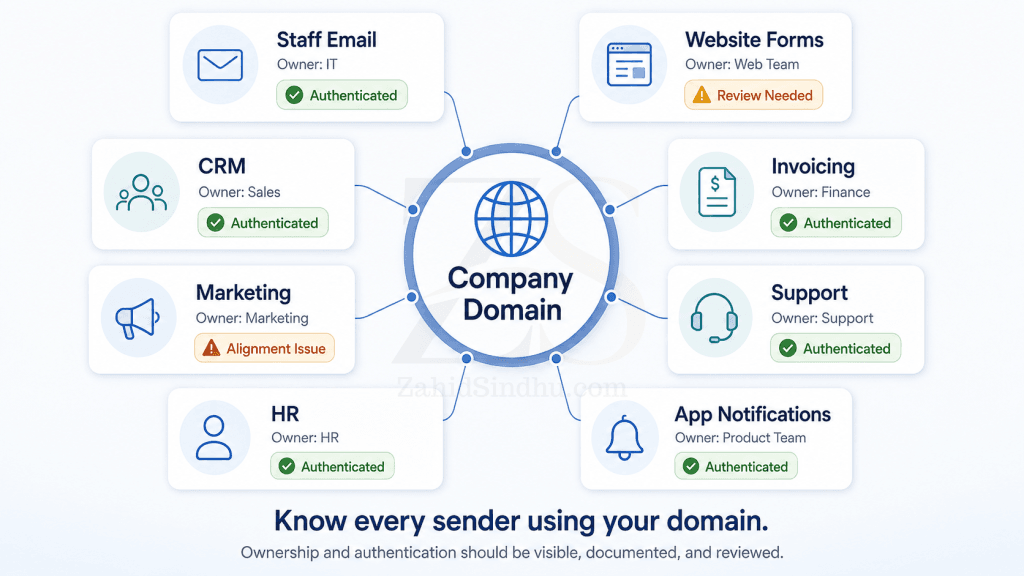
Each system may send messages carrying the company’s domain.
That makes each system part of the company’s email infrastructure, even when the service sits outside the company’s office, server, or main email platform.
This is where a technical configuration becomes a governance issue.
Who approved the platform?
Who configured its domain authentication?
Does it use the main company domain or a subdomain?
Does it support aligned DKIM?
Will someone remove its access when the contract ends?
Could an old supplier still send authenticated messages?
Who checks that it continues to work after a DNS change?
A department cannot safely add a new sending platform without involving whoever manages the company’s email identity.
The marketing team may see a newsletter application.
The finance team may see an invoicing application.
The IT team should see two new systems being authorised to speak using the company’s name.
DMARC reports create a map of your sending systems
DMARC reporting is often treated as technical noise.
It is better understood as an inventory of domain use.
Aggregate reports can show sources sending email with your domain and indicate how those messages performed against SPF, DKIM, and DMARC checks. The current DMARC specification describes these reports as a way for domain owners to identify mail streams using their domains.
This can reveal:
- approved platforms configured correctly
- approved platforms with broken alignment
- old services that remain active
- website servers sending directly
- forgotten marketing systems
- unauthorised services
- possible spoofing attempts
- traffic coming from unexpected infrastructure
That information has management value.
Better systems start with better records, and an accurate inventory of approved email senders is one of those records.
It helps answer:
- What systems represent the company by email?
- Who owns each system?
- Which systems still serve a business purpose?
- Which suppliers have access to our domain identity?
- Are old systems still sending?
- Which messages may break under a stricter DMARC policy?
A raw DMARC report is usually an XML file intended for machine processing, so businesses commonly use a reporting service or internal tool to turn it into readable information.
The output should not disappear into an unattended technical mailbox.
Someone needs responsibility for reviewing it and acting on anomalies.
A DMARC record with p=none is a starting point
Many companies publish a DMARC record using:
p=none
This places the domain in monitoring mode. Receiving servers can evaluate DMARC, and reports can be requested, but the domain owner expresses no quarantine or rejection preference for messages that fail.
That is useful during deployment.
A company can first collect reports, identify legitimate senders, fix alignment problems, and check how mail is flowing before applying a stronger policy.
The problem starts when p=none becomes permanent through neglect.
A business may proudly say that it “has DMARC” while still leaving failing messages without an enforcement request.
A sensible rollout normally follows this sequence:
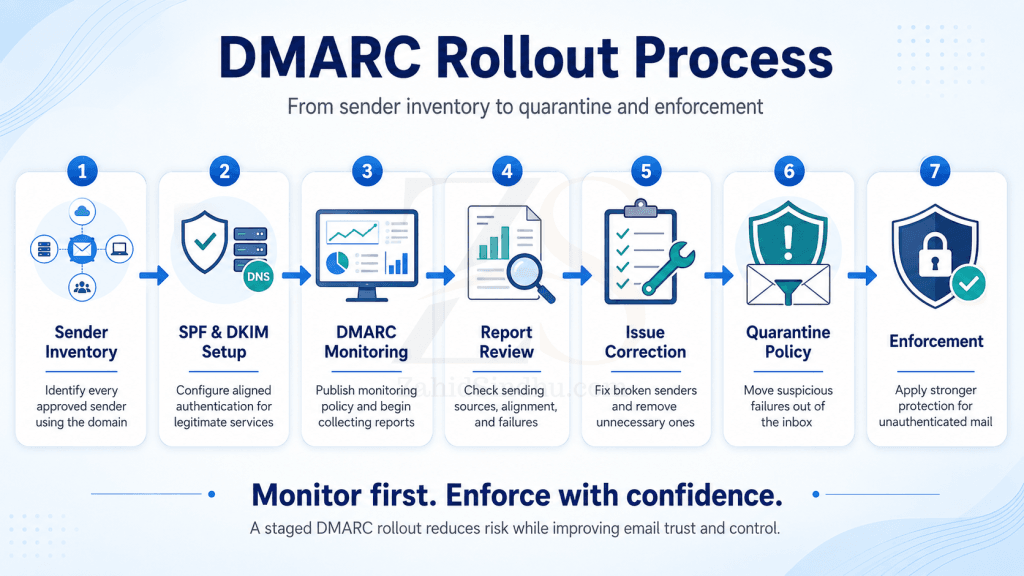
- Inventory all domains and subdomains.
- Identify every approved email sender.
- configure SPF for the correct sending sources.
- Enable aligned DKIM signing where supported.
- Publish DMARC in monitoring mode with reporting.
- Review reports and fix legitimate failures.
- Remove senders that no longer serve a business need.
- Test forwarding, mailing lists, website systems, and third-party services.
- Move to an enforcement policy when the mail streams are understood.
- Continue monitoring after enforcement.
Moving directly to p=reject without understanding legitimate senders can block real business email. Staying at p=none indefinitely leaves much of DMARC’s protection unused.
The right approach is staged, measured, and owned.
Passing an online test does not prove the whole system works
A domain can receive a green result from a basic DNS checker and still have weak email authentication.
Examples include:
- SPF exists but does not include the invoicing platform.
- DKIM records exist, but the sending service is not signing messages.
- DKIM passes, but the signing domain does not align with the From domain.
- DMARC exists with
p=none, but nobody reads the reports. - A website sends through the local web server instead of the approved mail service.
- An old provider remains authorised in SPF.
- Different departments have added services without central records.
- A third-party service changes message content and breaks a DKIM signature.
- Multiple SPF records have been published for the same domain.
The SPF specification does not permit multiple competing SPF records for one domain. SPF evaluation also places limits on DNS lookups, so repeatedly adding services can create a record that looks complete but produces a permanent error during evaluation.
This is why email authentication needs operational testing.
A proper review should test actual messages from every approved source. It should inspect message headers, alignment, authentication results, and reporting data.
DNS records alone tell only part of the story.
Separate mail streams to limit business risk
Sending every type of message through the same domain and infrastructure creates shared risk.
A poor marketing campaign can damage the reputation used by staff email. A compromised website can affect transactional email. A misconfigured third-party tool can create authentication failures across unrelated communication.
Businesses can reduce this exposure by separating major mail streams.
For example:
| Mail purpose | Possible sending identity |
|---|---|
| Staff communication | name@example.com |
| Billing and invoices | accounts@billing.example.com |
| Application notifications | alerts@notify.example.com |
| Marketing communication | news@marketing.example.com |
The exact structure depends on the business, but the principle is useful: separate systems with different risk, volume, ownership, and reputation profiles.
Microsoft recommends using a subdomain for third-party bulk services so problems with those services do not affect mail sent by users from the main domain. Yahoo also recommends separating marketing traffic from user, transactional, and alert traffic.
Segmentation also makes ownership easier to understand.
Marketing can own its sending platform without gaining authority over staff email. An application team can manage notification traffic without changing the identity used for invoices.
Email authentication exposes weak supplier management
A company may carefully control bank signatories and purchasing authority while allowing several software vendors to send email using its domain.
That is inconsistent.
A service authorised through SPF or DKIM has been given a form of communication authority. It can produce messages that recipients may associate with the company.
Supplier checks should therefore include questions such as:
- Does the service support custom-domain DKIM?
- Can it align the sending domain with the visible From address?
- Does it need access to the main domain?
- Can it use a dedicated subdomain?
- How are signing keys rotated?
- What happens when the service is cancelled?
- Can the company remove its sending authority immediately?
- Who monitors authentication failures?
- Does the supplier document its sending infrastructure?
These are procurement and risk questions as much as technical ones.
A cheap service that cannot authenticate properly may cost the business through failed delivery, support complaints, fraud exposure, or damage to domain reputation.
Ownership should be shared across the business
The technical work may sit with an email administrator, hosting provider, security team, or managed service provider.
Responsibility cannot sit there alone.
| Business function | Responsibility |
|---|---|
| Management | Treat the domain as a business identity asset and assign ownership |
| IT or email provider | Configure, test, monitor, and document authentication |
| Finance | Declare invoicing, payment, and accounting systems that send email |
| Marketing | Declare campaign, automation, and CRM platforms |
| HR | Declare recruitment, payroll, and employee communication systems |
| Software teams | Authenticate application and transactional mail |
| Procurement | Review email authentication support before buying a service |
| Security | Investigate spoofing, unusual senders, and authentication changes |
| Department heads | Avoid introducing unapproved sending services |
The objective is not to make every manager understand DNS syntax.
The objective is to stop business units from making domain-level decisions without realising it.
Questions every business should be able to answer
A business with good control over its email identity should know:
- Which domains and subdomains can send email?
- Which platforms send on behalf of each domain?
- Who approved every sending service?
- Does each service pass aligned SPF or DKIM?
- Who reviews DMARC reports?
- What policy applies to failed messages?
- Which systems send invoices, password resets, and account alerts?
- Are marketing and transactional messages separated?
- Can former suppliers still send authenticated mail?
- What happens when a new department signs up for an email platform?
- How quickly can sending authority be revoked?
- When was the last end-to-end test performed?
If the answers exist only inside one technician’s memory, the company does not have a controlled system.
It has an undocumented dependency.
Email authentication is part of business trust
SPF, DKIM, and DMARC may live in DNS, but their effect appears throughout the company.
They affect:
- communication reliability
- sales follow-up
- invoice delivery
- customer access
- fraud prevention
- supplier control
- domain reputation
- incident investigation
- business continuity
- customer trust
The company domain is part of the company’s identity.
Managing who can send with that identity should receive the same care as managing website access, banking permissions, software accounts, and official documents.
The technical records matter.
The business ownership behind them matters even more.
FAQ Section
A small business may not fall under bulk-sender requirements, but it still benefits from all three controls. Small companies also send invoices, password resets, quotations, and payment instructions. Their domains can also be spoofed.
Google currently requires at least SPF or DKIM for all senders to personal Gmail accounts and recommends using SPF, DKIM, and DMARC together.
No. SPF checks the sending source for the envelope domain, which may differ from the From address visible to the recipient. DMARC adds alignment with the visible From domain.
No. Authentication helps establish sender identity, but delivery also depends on reputation, recipient complaints, sending behaviour, message content, infrastructure, and the recipient’s filtering rules.
Yes. Legitimate messages may fail if a service has not been configured correctly or if an indirect mail flow breaks authentication. Businesses should review reporting data and fix authorised senders before moving to stricter enforcement.
No. DMARC addresses unauthorised use of a protected domain in the visible From address. It does not stop attacks from similar-looking domains or messages sent through a compromised legitimate account.
Have a systems problem worth discussing?
If this note connects with something you are dealing with in your business, club, team, or workflow, send me a short message with context.
I’m interested in practical problems around records, communication, email, hosting, AI-assisted work, CRM planning, client follow-up, and operational systems.
Zahid’s Field Notes
Practical notes from the builder’s desk.
Occasional notes on digital systems, canine administration, business workflows, AI, email, hosting, and the small operational details that shape trust.
What I usually write about:
- How better records improve daily operations
- Why email, hosting, and infrastructure still matter
- What canine clubs can learn from business systems
- Practical AI use without losing human control
- Lessons from building and operating real systems
No fixed schedule. No recycled content. Just useful notes when there is something worth sharing.