
AI Should Support Human Judgment, Not Replace It
AI and human judgment should work together, but they should not carry the same responsibility. AI can process information, compare options, summarize records, and point out patterns. It cannot understand the full business context, carry moral responsibility, or answer for the result when a decision affects people.
That distinction matters.
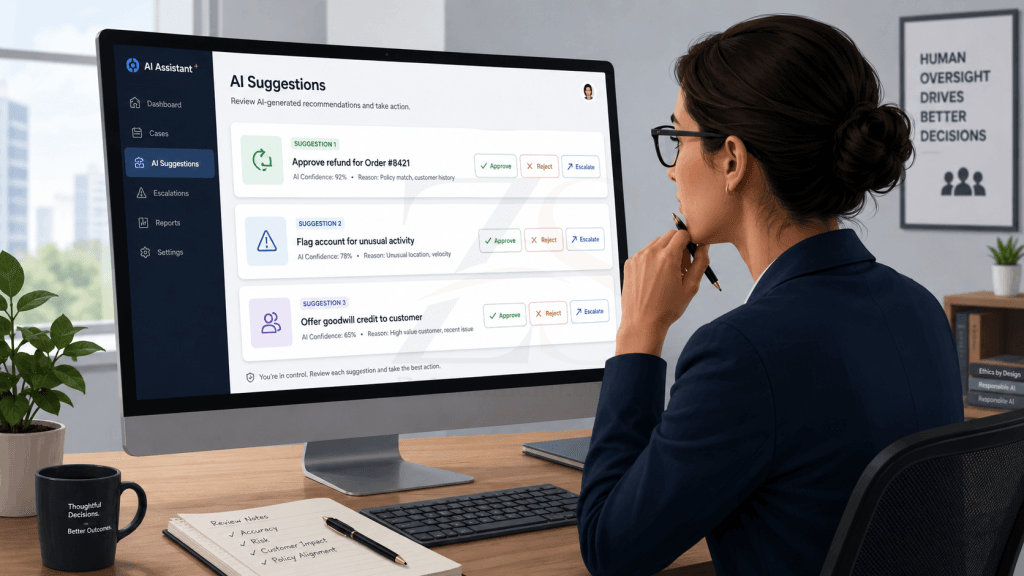
A lot of weak AI adoption starts with the wrong question. People ask, “Can AI make this decision?” A better question is, “What part of this decision can AI help a person make better?”
Those are two very different things.
Used well, AI improves the quality of human judgment. Used badly, it gives people a clean excuse to stop thinking.
The problem is not AI. The problem is lazy delegation.
AI is useful because it reduces mental load. It can read long documents, find inconsistencies, compare data, draft responses, summarize conversations, and suggest next steps.
That is helpful.
The danger starts when people treat the output as a decision instead of a recommendation.
A business owner may ask AI to review a client dispute. A manager may ask AI to shortlist candidates. A club secretary may ask AI to assess a complaint. A support team may ask AI how to respond to an angry customer.
In all these cases, AI can help. But the final decision still needs a person who understands the context.
Who is the client?
What was promised?
What is the history?
What is fair?
What is the business risk?
What will this decision mean six months later?
Who will answer if the decision is challenged?
AI can assist with these questions. It cannot own them.
What human judgment actually means
Human judgment is not guesswork. It is the ability to weigh facts, context, consequences, experience, and responsibility before taking action.
In business, judgment often means knowing when the normal rule should apply and when the exception matters.
A system can flag that a payment is overdue. A person may know that the client has paid on time for seven years, had a genuine issue this month, and deserves a careful response.
A system can show that a support ticket violates the standard scope of work. A person may know that the issue came from unclear instructions sent by the company.
A system can rank a candidate lower because of missing keywords. A person may see a pattern of practical experience that the system missed.
This is where judgment matters. It fills the gap between data and responsibility.
AI is good at patterns. People are better at meaning.
AI works by finding patterns in data and language. That makes it strong at tasks where the problem is clear and the material is available.
It can help answer questions like:
- What does this long email thread say?
- Which records are missing?
- What are the common complaints from customers?
- Which invoices are unpaid?
- What changed between two document versions?
- What are the likely risks in this contract clause?
- What questions should we ask before approving this request?
These are useful tasks. They save time.
But meaning is different from pattern.
A customer’s short reply may look rude to AI. A human may know the customer is under pressure, does not write polished English, and has been reasonable in every previous conversation.
A committee member’s complaint may sound strong on paper. A human may know the complaint is part of a long political dispute.
A technical support request may look simple. A human may know that touching the DNS record without written approval could create a major dispute later.
AI can read the message. It cannot fully read the relationship.
The clean answer can be the most dangerous one.
One reason people overtrust AI is that its answers often look organized.
A weak human answer may look messy. An AI answer may look structured, confident, and complete. That creates a false sense of reliability.
This is a real problem in business.
People already like easy answers. AI can make easy answers look professional.
A founder may ask for a strategy and get a neat five-point plan. A manager may ask for a policy and get a clean document. A secretary may ask for a reply to a member and get something polite and firm.
The writing may be good. The thinking may still be incomplete.
Good judgment asks harder questions:
- What information is missing?
- Who benefits from this decision?
- Who may be harmed by it?
- What assumption is the answer making?
- What would change my mind?
- Do we have a proper record?
- Is this fair, or only convenient?
AI can help ask these questions. It should not be allowed to skip them.
The right role for AI: assistant, analyst, and second reader
In most business settings, AI should play one of three roles.
1. AI as an assistant
This is the safest and most common use.
AI can draft, summarize, clean up, organize, and prepare material. A human still reviews the work and decides what to send, approve, publish, or reject.
Examples:
- Drafting a reply to a client
- Summarizing a meeting
- Turning scattered notes into a checklist
- Preparing a first version of a policy
- Creating a comparison table from supplied information
This is low-risk when the user checks the result.
2. AI as an analyst
Here, AI helps examine information.
It can compare records, spot missing details, flag contradictions, and suggest possible causes. This is useful in support, billing, operations, club administration, and content planning.
Examples:
- Reviewing a long client approval trail
- Finding gaps in a dog club registration record
- Comparing quotation, purchase order, delivery note, invoice, and payment
- Grouping support tickets by cause
- Reviewing website content for weak sections
This can improve decision quality, but only if the source data is good.
Bad records produce bad AI output.
3. AI as a second reader
This is one of the best uses of AI.
After a person makes a draft decision, AI can challenge it. It can ask what has been missed, list risks, identify unclear wording, and suggest alternative views.
This is better than asking AI to decide first.
The person remains in charge. AI becomes a pressure test.
The wrong role for AI: silent decision-maker
AI becomes risky when it quietly becomes the decision-maker, while a human only clicks approve.
That is not real oversight.
A person rubber-stamping AI output has not added judgment. They have only added a name to the decision.
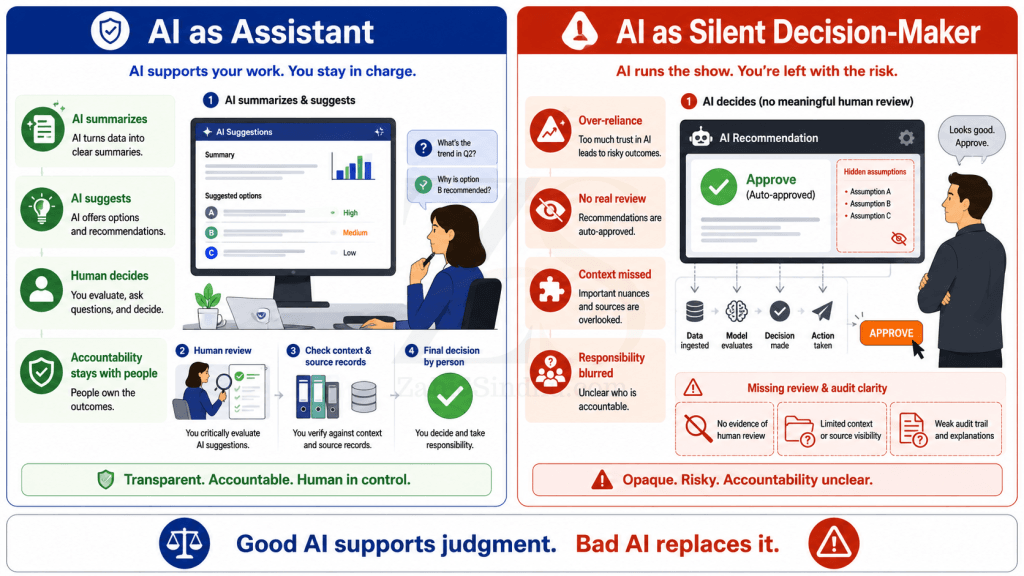
This happens when:
- Staff are too busy to review AI output properly
- The AI answer looks confident
- The process has no review checklist
- No one records why the decision was made
- Managers reward speed over correctness
- The person reviewing the output lacks authority to challenge it
This is how AI turns from a tool into an unmanaged actor inside the business.
The company may still say “a human approved it.” But approval without real review is weak governance.
Human-in-the-loop is not enough
Many people use the phrase “human-in-the-loop” as if it solves the problem.
It does not.
A human in the loop is useful only when that person has:
- The right information
- Enough time
- Clear authority
- Skill to question the AI
- A process for recording the reason
- Permission to override the system
Without these, the human becomes a decoration.
A junior employee who cannot challenge the system is not oversight. A tired manager approving 200 AI suggestions in a queue is not oversight. A support agent who must follow the AI script is not exercising judgment.
Real human review needs power.
Good AI use starts with better records.
AI does not remove the need for proper records. It increases the need.
If customer history is scattered across WhatsApp, email, spreadsheets, verbal instructions, and memory, AI will struggle. It may produce a confident answer from incomplete material.
This is why business systems matter.
Before using AI for decisions, a business should ask:
- Where is the source record?
- Is the record complete?
- Who entered it?
- When was it updated?
- Is there an approval trail?
- Can we trace the decision later?
- Can a person challenge the output?
AI works better when the business has clean records, clear ownership, and connected systems.
A company with poor records does not become intelligent by adding AI. It becomes faster at exposing its own confusion.
Practical examples from business operations
Client support
AI can summarize a support thread, identify the client’s main issue, and suggest a reply.
But a person should decide the tone, the concession, and the next action.
A hosting support issue may involve DNS changes, email delivery, backups, security, or billing. The technical answer may be simple. The business decision may not be.
For example, changing a DNS record based on a chat message may be fast, but it may be risky. A person with experience will insist on a proper written approval trail.
AI may help draft the approval request. It should not decide to bypass the record.
Billing and payments
AI can flag overdue invoices, payment mismatches, duplicate entries, and missing purchase orders.
But a person should decide how to handle the client.
Some clients need a reminder. Some need a call. Some need service limits. Some deserve patience because the relationship is long and clean.
The accounting record gives facts. Judgment decides the response.
Hiring
AI can help review resumes, compare role requirements, and prepare interview questions.
But it should not silently reject people.
Hiring involves potential, attitude, communication, context, and fairness. AI may miss capable people who do not use the right keywords. It may also favor polished resumes over practical ability.
The stronger use is to ask AI, “What should I check in the interview?” not “Who should I hire?”
Canine club administration
AI can help a canine club summarize member complaints, organize event entries, review missing dog records, and prepare notices.
But club decisions often involve rules, fairness, member history, committee authority, and politics.
A tool can support the secretary. It should not become the committee.
The club still needs clear records, proper approvals, and people willing to make decisions openly.
A simple rule: AI can recommend. People must decide.
This rule will save many businesses from poor AI adoption.
AI can recommend:
- A reply
- A risk level
- A classification
- A next step
- A document summary
- A list of missing items
- A possible decision
A person must decide:
- What is fair
- What is acceptable
- What risk to take
- What exception to allow
- What message to send
- What action to approve
- What record to keep
That separation should be visible in the workflow.
If an AI-assisted decision cannot show who approved it and why, the system is incomplete.
How to design AI-assisted decisions
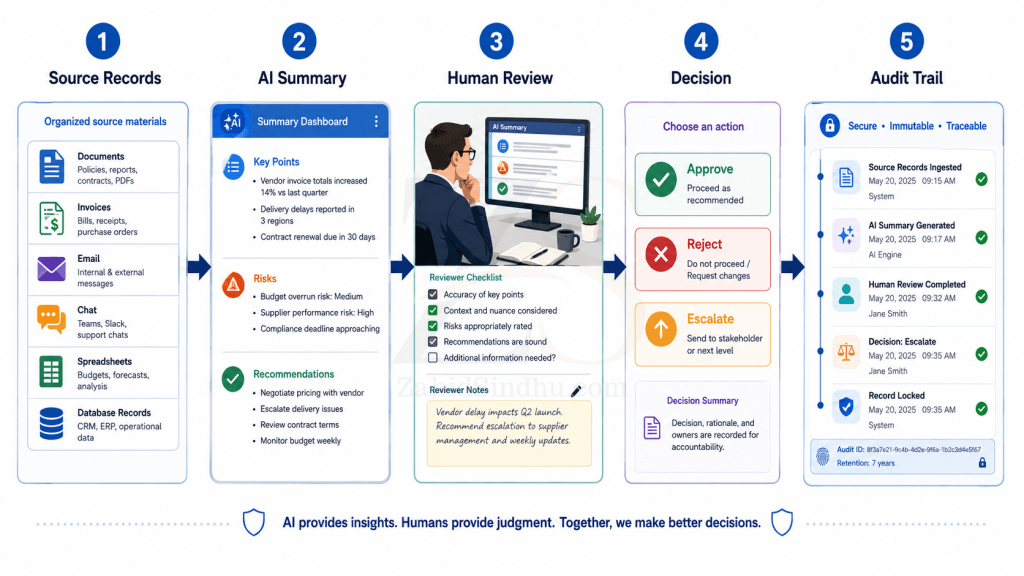
A practical AI workflow should have six parts.
1. Define the decision owner
Every AI-assisted process needs a named human owner.
Not a department. Not “the system.” A person or role.
For example:
- Support Manager approves service exceptions
- Finance Manager approves write-offs
- Club Secretary prepares member notices
- Committee approves disciplinary action
- Founder approves sensitive client replies
AI can prepare the work. The owner makes the call.
2. Define what AI is allowed to do
Do not give AI a vague role.
Write down the boundary.
For example:
- AI may summarize email threads
- AI may draft replies
- AI may flag missing documents
- AI may suggest risk levels
- AI may not approve refunds
- AI may not change account status
- AI may not send sensitive replies without review
- AI may not reject applications automatically
Clear boundaries reduce lazy delegation.
3. Require source records
AI output should point back to the source material.
If the AI says a client approved a change, the user should be able to see the approval email. If it says a payment is pending, the user should be able to see the invoice and ledger entry. If it says a member submitted a document, the record should be available.
No source, no decision.
4. Add review triggers
Some decisions need extra review.
For example:
- High-value refunds
- Account suspension
- Data deletion
- Legal complaints
- Staff termination
- Public statements
- Member discipline
- Pedigree or ownership disputes
AI can help prepare these cases, but the workflow should force human review.
5. Record the reason
The final decision should include a short reason.
This does not need to be long. It only needs to be clear.
For example:
“Approved because the written request came from the authorized email address and matched the purchase order.”
“Rejected because the required ownership document was not provided.”
“Escalated because the client disputes the original approval trail.”
This creates accountability. It also helps future AI tools learn from better records.
6. Keep an override option
Humans must be able to reject the AI suggestion.
If the system makes override difficult, people will follow the machine even when they disagree.
That is bad design.
A good system lets people say:
- AI missed context
- Source record incomplete
- Relationship history matters
- Policy exception approved
- Needs senior review
- Do not proceed
Judgment needs room to act.
When AI should not be used as the main guide
There are situations where AI should stay in a support role only.
Be careful when the decision involves:
- Legal risk
- Medical advice
- Employment action
- Financial harm
- Personal reputation
- Safety
- Children
- Sensitive personal data
- Member discipline
- Client trust
- Public accusations
In these cases, AI can organize material, prepare questions, and create summaries. A qualified person should decide.
The higher the risk, the stronger the human review should be.
The founder’s responsibility
For founders and business owners, the issue is simple.
You cannot outsource responsibility to AI.
If an AI-assisted decision damages a client relationship, creates a legal issue, rejects the wrong person, sends a careless reply, or approves the wrong change, the business owns the result.
Not the software.
This is why AI adoption should be treated as an operations decision, not a tech experiment.
The question is not, “Which AI tool should we use?”
The better questions are:
- What decisions are we improving?
- What records does AI need?
- Who reviews the output?
- Who can override it?
- What gets logged?
- What should never be automated?
- How do we know the process is working?
These questions sound basic. That is why many people skip them.
They should not.
AI should make people sharper, not passive.
The best use of AI is not to replace thinking. It is to improve thinking.
AI can give a busy founder a clearer summary. It can help a manager see missing details. It can help a support team respond faster. It can help a club secretary prepare cleaner records. It can help a business owner compare options before making a call.
That is real value.
But the person must stay awake in the process.
A good AI-assisted business should have better questions, better records, better review, and better decisions.
If AI makes the team faster but less accountable, the business has not improved. It has only automated weak judgment.
Conclusion
AI should support human judgment, not replace it.
That is not an anti-AI position. It is the only practical way to use AI in serious work.
AI is strong at processing information. People must remain responsible for meaning, fairness, exceptions, relationships, and consequences.
The right model is simple.
Let AI prepare. Let AI compare. Let AI question. Let AI summarize. Let AI find gaps.
But let people decide.
And make sure the record shows who decided, why they decided, and what information they used.
That is how AI becomes a useful business tool instead of a quiet source of bad decisions.
FAQ Section
AI can support business decisions, but it should not own decisions that affect money, access, service, employment, reputation, or trust. Use AI to prepare information and suggest options. Keep a person responsible for the final call.
Human judgment means a person reviews facts, context, risk, fairness, and consequences before taking action. It also means the person has authority to reject or change the AI suggestion.
No. A human-in-the-loop process only works if the person has time, skill, authority, and access to the source records. Rubber-stamping AI output is not real review.
Start with support tasks: summaries, drafts, checklists, record cleanup, and comparison work. Avoid using AI as the final decision-maker in high-risk areas.
AI depends on the information it receives. If records are scattered, outdated, or incomplete, AI may produce confident but weak output. Better records lead to better AI-assisted decisions.
Have a systems problem worth discussing?
If this note connects with something you are dealing with in your business, club, team, or workflow, send me a short message with context.
I’m interested in practical problems around records, communication, email, hosting, AI-assisted work, CRM planning, client follow-up, and operational systems.
Zahid’s Field Notes
Practical notes from the builder’s desk.
Occasional notes on digital systems, canine administration, business workflows, AI, email, hosting, and the small operational details that shape trust.
What I usually write about:
- How better records improve daily operations
- Why email, hosting, and infrastructure still matter
- What canine clubs can learn from business systems
- Practical AI use without losing human control
- Lessons from building and operating real systems
No fixed schedule. No recycled content. Just useful notes when there is something worth sharing.